
Langflow 1.10 just released!
gradient
  1. Home  /

  2. Blog  /

  3. Langflow Micro Tutorials — Enhanced Truncator

Langflow Micro Tutorials — Enhanced Truncator

Rodrigo Nader

Written by Rodrigo Nader

September 15, 2023

Welcome back to our Langflow micro tutorials series! We’re continuing with simple Langflow examples, emphasizing the design of custom components.

This article includes a link for downloading the described flow. Use it to modify and understand the components involved.

Today, we’re focusing on an enhanced version of our Document Truncator, demonstrating how to add options to a custom component. Enjoy!

Main Features

Enhanced Document Truncator: This custom component enables document truncation while preserving either the initial or final characters as determined by the truncate_size. The build_config method is used to customize the input fields, including the dropdown selection box.

Objective

The aim of this flow is to demonstrate the usefulness of field customization when creating custom components.

In this updated version of our custom component, we not only let the user decide how many chars to truncate but also add a dropdown field to decide how this process will happen — pass either the first or last truncate_size characters to the prompt template — which can be done by using the build_config method.
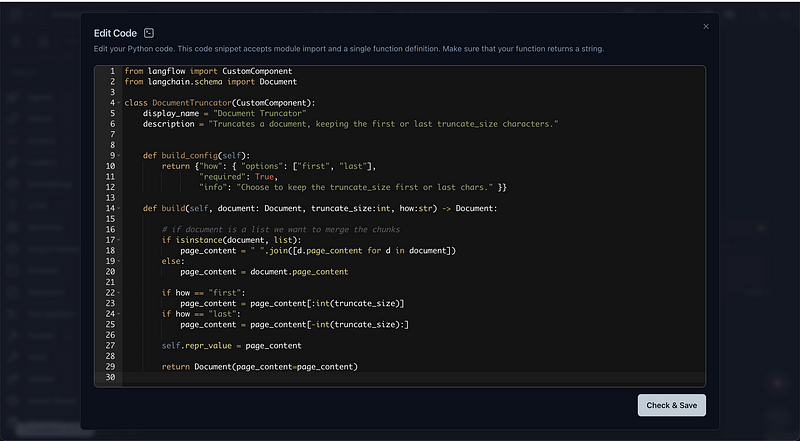
Here we created a str input field and assigned it to have options (meaning it is a dropdown selector) in the config dict. We also defined this field as required and created an info tooltip for it.

Below is the corresponding build_config function:

def build_config(self): 
    return {"how": { "options": ["first", "last"],  
            "required": True,  
            "info": "Select whether to retain the first or last characters as specified by the 'truncate_size'." }}

Finally, we also set the self.repr_value variable, which determines the content to be displayed in the component status icon. Here I chose to display the truncated text.

This status will show completely different outputs depending on the how field input_._



Download Flow (gist)


Similar Posts

Langflow 1.10 Desktop is now available

Langflow 1.10 Desktop is now available

Langflow Dev Team

Written by Langflow Dev Team

June 18, 2026

Langflow 1.10 Desktop is now available. For the full list of new features and platform updates in 1.10, see the OSS release announcement.

Langflow 1.10 released: Assistant flow building, Memory bases, DB Providers, internationalization, and more

Langflow 1.10 released: Assistant flow building, Memory bases, DB Providers, internationalization, and more

Langflow Dev Team

Written by Langflow Dev Team

June 9, 2026

Langflow 1.10 expands Langflow Assistant to build entire flows, introduces Memory bases for long-term semantic memory, adds configurable vector database backends, brings the interface to seven languages, and more.

Scaling Langflow: Unlocking Massive Memory Savings and Bulletproof Reliability

Scaling Langflow: Unlocking Massive Memory Savings and Bulletproof Reliability

Langflow Dev Team

Written by Langflow Dev Team

June 9, 2026

The Langflow engineering team breaks down a comprehensive package of memory and stability enhancements spanning v1.9.0 through v1.10.0—achieving an ~89% reduction in memory consumption through dependency pruning, worker lifecycle management, and advanced Linux Copy-on-Write techniques.

Langflow Policies: Turning Natural-Language Rules into Guarded Tools

Langflow Policies: Turning Natural-Language Rules into Guarded Tools

Langflow Dev Team

Written by Langflow Dev Team

May 20, 2026

Langflow's new Policies feature compiles natural-language business rules into deterministic guards around agent tools—so policy violations are caught before they happen, not after.