Kicking off Launch Week, we are excited to share a major update to Langflow's MCP (model context protocol) capabilities.
This update allows you to use Langflow as both an MCP client and MCP server. As a client, you can use our built-in MCP component to interact with external MCP servers within your agentic flows. As a server, you can turn your existing Langflow workflows into tools that other MCP clients can access and orchestrate.
What is MCP?
If you're not already familiar, MCP is like the USB-C of agentic tools. Imagine a universal interface that simplifies your interactions with a myriad of tools. Anthropic introduced this protocol months ago, and it has significantly expanded the toolbox available to Langflow users. Let’s explore how this works!
Getting Started with MCP in Langflow
Langflow just shipped its 1.3 release, so you'll need to install or update your version of Langflow:
uv pip install langflow
Once you have 1.3, adding an MCP tool in any flow is easy. Just search for “mcp” in the left navigation search bar and drag the “MCP Server” component into your flow.
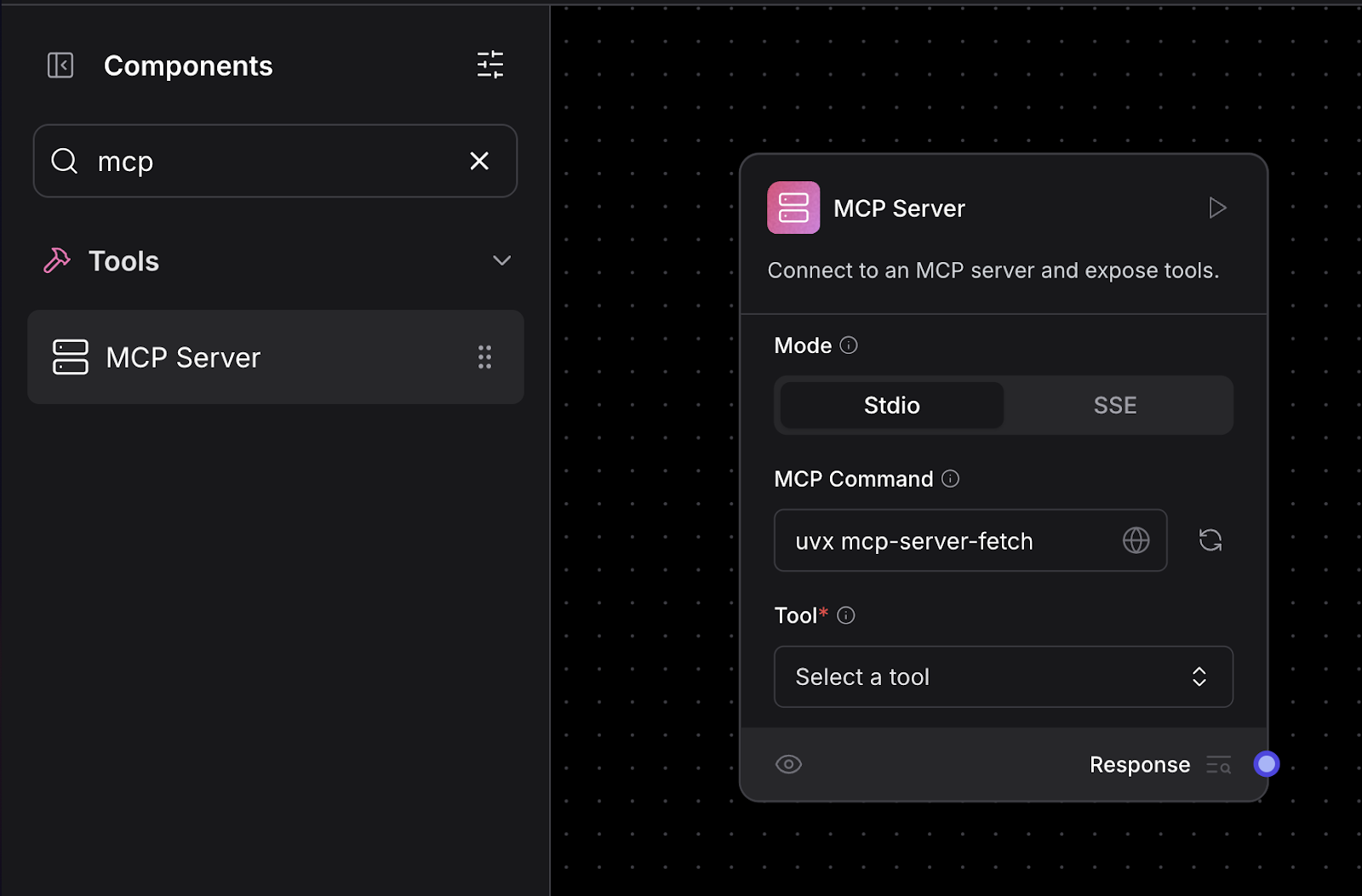
The “MCP Server” component can be used either as a standalone component or as an agentic tool. In either case, just enter in an MCP command or SSE server URL and click refresh.
Here’s an example of using the fetch() MCP tool.
Standalone mode
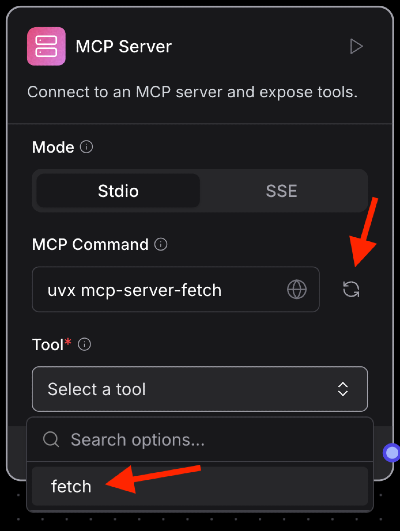
When used as a standalone component, click the refresh button after entering the command, then choose the tool you wish to use.
Once a tool is selected, you’ll be presented with a set of parameters to fill out.
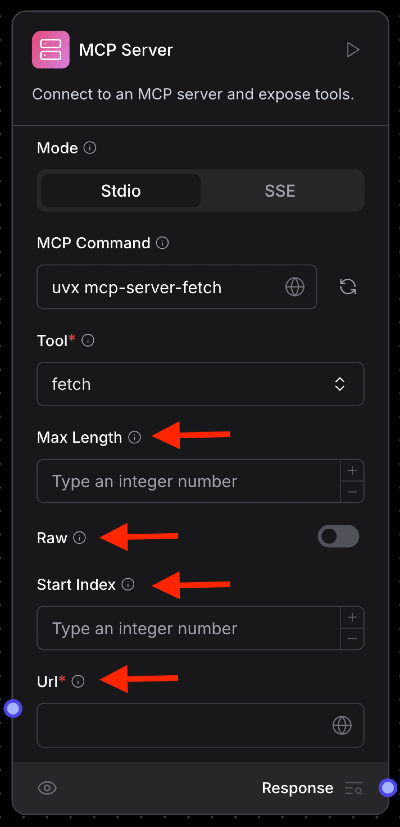
Hover over the tooltip icons to get a description of any parameter
Tool mode
You can also use MCP components directly as agentic tools.
To do so, click on the component, then switch the Tool Mode radio toggle at the top.
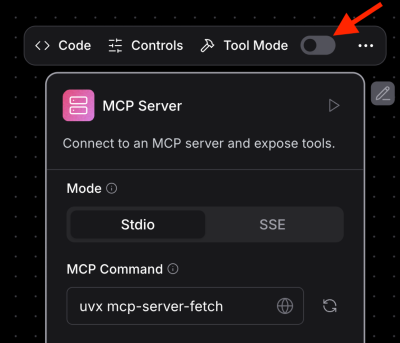
A cool feature of tool mode is you don’t have to fill out any parameters yourself. Your agent will determine which parameters and what values to use based on your input to the agent itself. You can view and modify tools and their descriptions by clicking on the “hammer” icon.
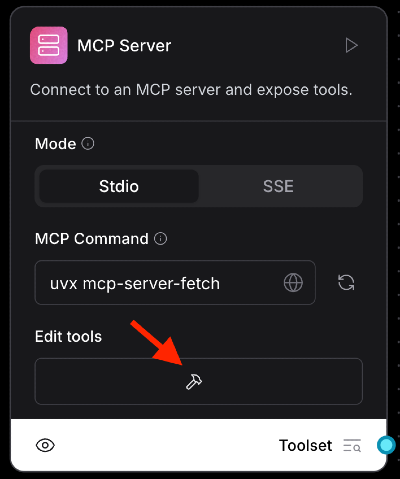
Note: Different models are better than others at handling this task. Some can easily determine which parameters and values are needed. Others may need a little direction in your prompt. In either case, it’s good to know what parameters a particular tool expects for the best experience.
Tools with Environment Variables
You may find some tools require you to use an environment variable to work. EverArt is an example of this. If that’s the case, just set the variables before you execute the tool command (uvx, npx, docker, etc…) directly in the MCP Command section of the component itself.
Here’s an example of setting an env before the command:
env EVERART_API_KEY=everart-****************** npx -y @modelcontextprotocol/server-everart
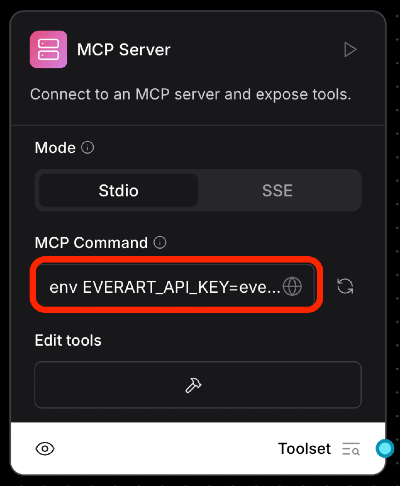
Now, using the EvertArt MCP tool, we can generate images directly in our agentic flows without needing to code up a vision model API in our application.
Langflow as an MCP Server
One of the most exciting aspects is that Langflow itself is an MCP server. Imagine chaining complex actions together or easily exposing your Langflow flows as tools to other platforms. You don’t need to configure anything in Langflow itself, just point those platforms to your Langflow instance using the /api/v1/mcp/sse endpoint.
Let’s take a look at some examples to see how to do this using Langflow locally at http://127.0.0.1:7860.
Cursor
In Cursor, go to Cursor Settings -> MCP. Click “+ Add new global MCP server”, update the mcp.json like you see below, and save the file.
{
  "mcpServers": {
    "Langflow": {
      "url": "http://127.0.0.1:7860/api/v1/mcp/sse"
    }
  }
}
Once complete your MCP section should look like this. Refresh the connection.
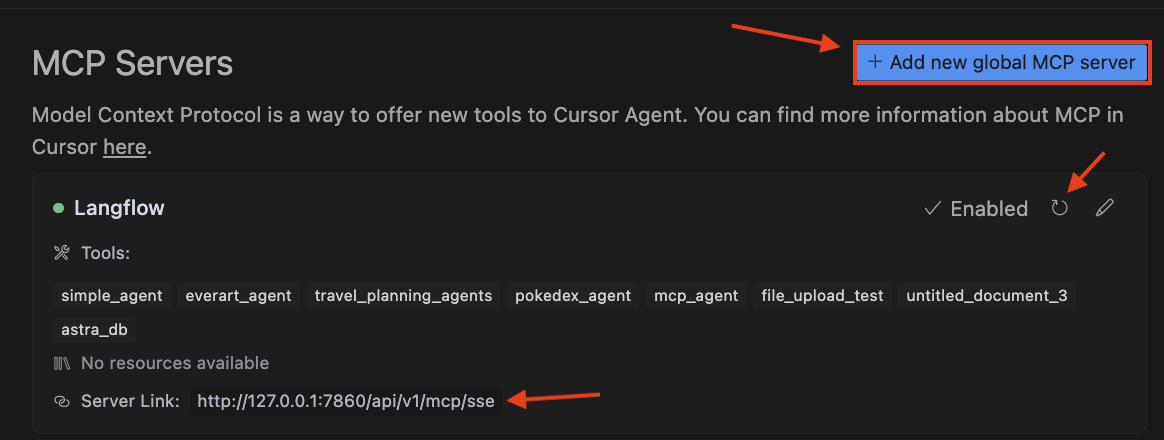
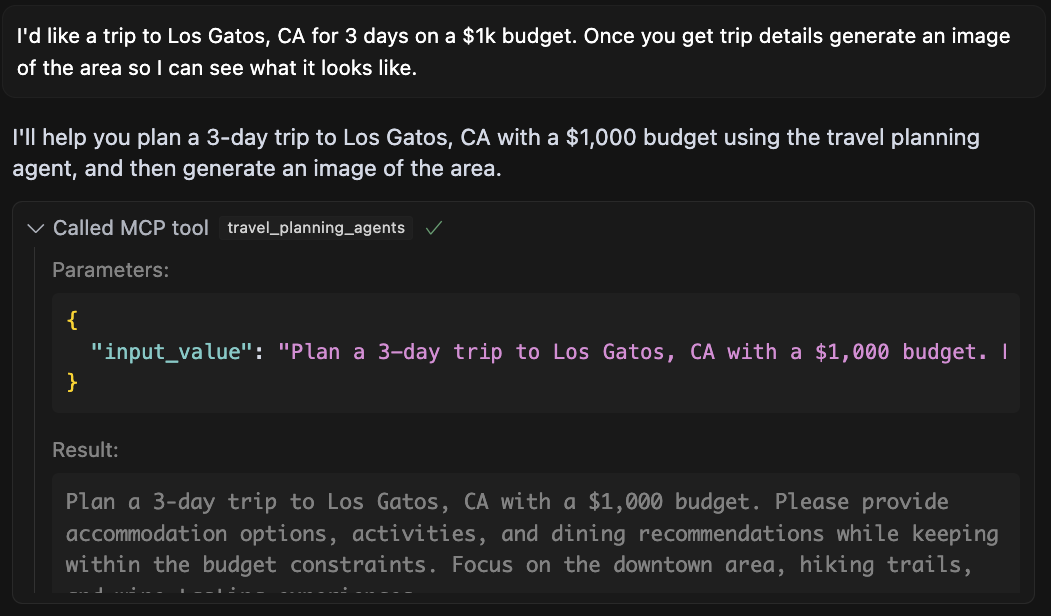
Now, your Cursor agents should be able to use any of your Langflow flows as tools.
Claude Desktop
While Claude needs a bit more config than Cursor, it still uses the same SSE URL. Watch this video tutorial on how to set it up.
{
  "mcpServers": {
    "Langflow": {
      "command": "/bin/sh",
      "args": [
        "-c",
        "/Users/david.gilardi/.langflow/uv/uvx --python /usr/bin/python3 mcp-sse-shim@latest"
      ],
      "env": {
        "MCP_HOST": "http://127.0.0.1:7860",
        "DEBUG": "true"
      }
    }
  }
}
MCP Inspector
Finally, an application you should definitely have in your MCP toolbelt is MCP Inspector. The MCP Inspector allows you to inspect and experiment with any MCP tool. This is great for troubleshooting if you’re having trouble with a given tool.
Again, to connect it to Langflow paste in your Langflow mcp endpoint URL field and click Connect.
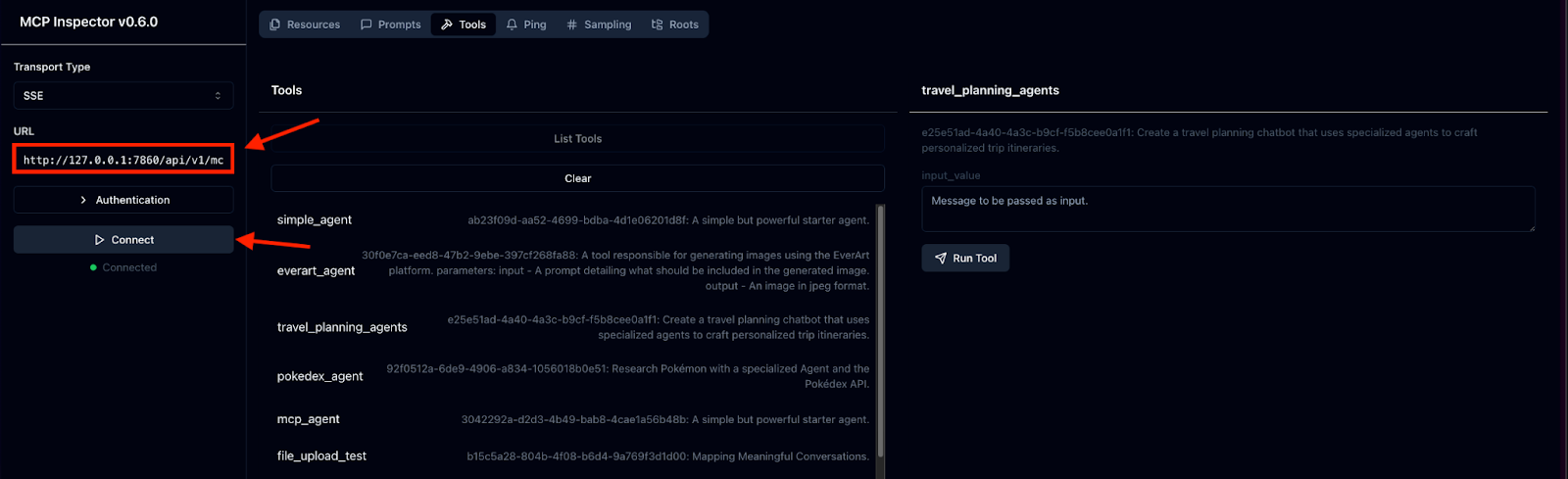
From here you can list and execute any of your Langflow flows as MCP tools.
Tips for Success
MCP significantly increases the landscape of tools you have at your disposal. However, it’s still somewhat new and hasn’t fully matured yet as a protocol. With that, here are some considerations you should keep in mind when using it.
- Ensure tool names don't contain spaces or special characters
- Be explicit with input/output parameters for clarity
- Use MCP Inspector to explore and understand tool parameters
Final Thoughts
So, what does this all mean? With Langflow now supporting MCP tools and acting as an MCP server, you have a much wider range of tools at your disposal. This makes it easier to connect different systems, automate complex tasks, and build powerful GenAI and agentic solutions. By combining MCP with Langflow's existing features and tools, you can streamline your development process and achieve more with less effort.
Now that you know what you can build with MCP, here are some next steps:
- Join the Langflow Discord and let us know what you're building!
- Register for our Launch Week Livestream to hear more about the
1.3and a HUGE surprise we're announcing on Thursday. - Check out our project on Github and give us a star if you like what you see!