Agentic workflows are powerful because they let an LLM decide not just what to say, but what to do. This is also where things get risky.
In real business systems, "good intentions" are not enough. An agent may need to follow limits, restrictions, or procedures every time it touches a tool. Langflow's Policies feature is built for exactly this gap. Instead of treating policies as extra prompt text and hoping the model remembers them, the Policies component turns natural-language business rules into executable guards around tools, so tool calls are checked before they run. Your tools become guarded tools.
Read on to learn more, and make sure you check out the step-by-step video demo.
How to write policies
A useful way to think about policies is that they are one layer lower than prompts and reasoning. Prompts shape behavior, while policies constrain execution.
You write policies as text in natural language, and Langflow uses ToolGuard to compile those policies into validation logic attached to the tools an agent can access. At runtime, the agent still plans actions normally, but any guarded tool call must pass its policy checks before execution. This logic changes policy enforcement from a soft instruction into a deterministic control point at the exact place where business risk actually happens: the tool boundary. Langflow's Policies component documentation describes this as generating guard code from natural-language policies ("buildtime" step) and then reusing that guard code to enforce compliance during execution ("runtime" phase).
The quality of the tool guard depends on the quality of the policy text. ToolGuard recommends that each policy be a single, self-contained rule that is specific, restrictive, deterministic, and enforceable before the tool is called. Avoid vague instructions like "validate properly," and instead writing rules that can be checked from tool arguments or retrievable state, such as hard limits, explicit conditions, and well-defined exceptions.
For more information, see this guide on effectively writing policies for ToolGuard.
Protect your tools' execution with Policies: A Step-by-Step Guide
The exciting part is not just that Langflow can "understand" policy text. It is that those policies become operational. Instead of asking an agent to remember the rules, we can bind the rules to the actions themselves.
Let's consider an example scenario:
We are building an agentic workflow for a clinic where customers can book doctor appointments. Different doctors have different specialties and varying availability slots. Customers are identified by unique IDs and belong to membership tiers such as "Gold," "Silver," and "Regular." Appointment pricing depends on the customer's membership level.
In this example, we build an agentic workflow with a single policy: "Only Gold customers are eligible for a 10% discount on all doctor appointments."
-
Drag a Policies component onto the canvas alongside an Agent. Assume the agent's tools are provided by an MCP server in the left tab.
-
Connect the MCP toolset to the Policies component's tools input, and connect the Guarded Tools (the Policies output) to the agent's tools. This transforms the raw (unprotected) toolset into a set of tools, each wrapped with a protection layer.
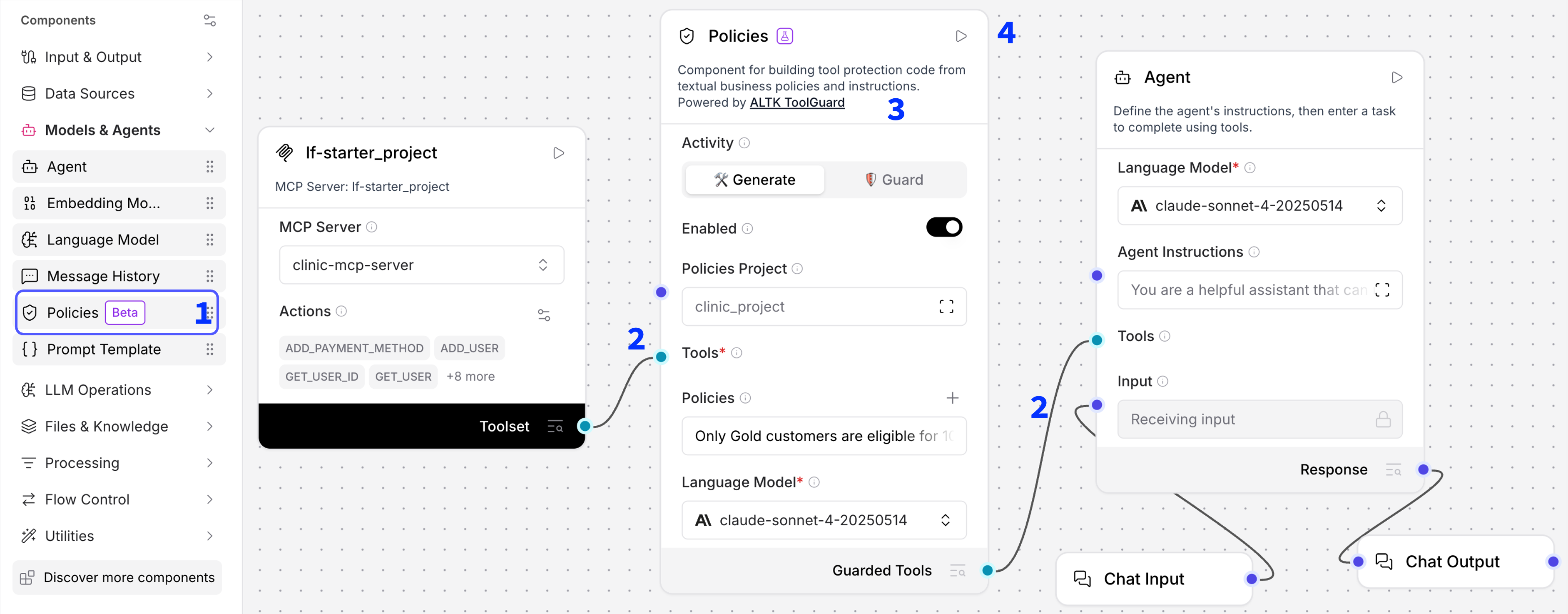
Step 2 – MCP toolset connected through the Policies component into the Agent. -
Configure the Policies component.
- Use "Generate" mode for the initial guard code generation, after review & approval switch to "Guard" mode for runtime execution.
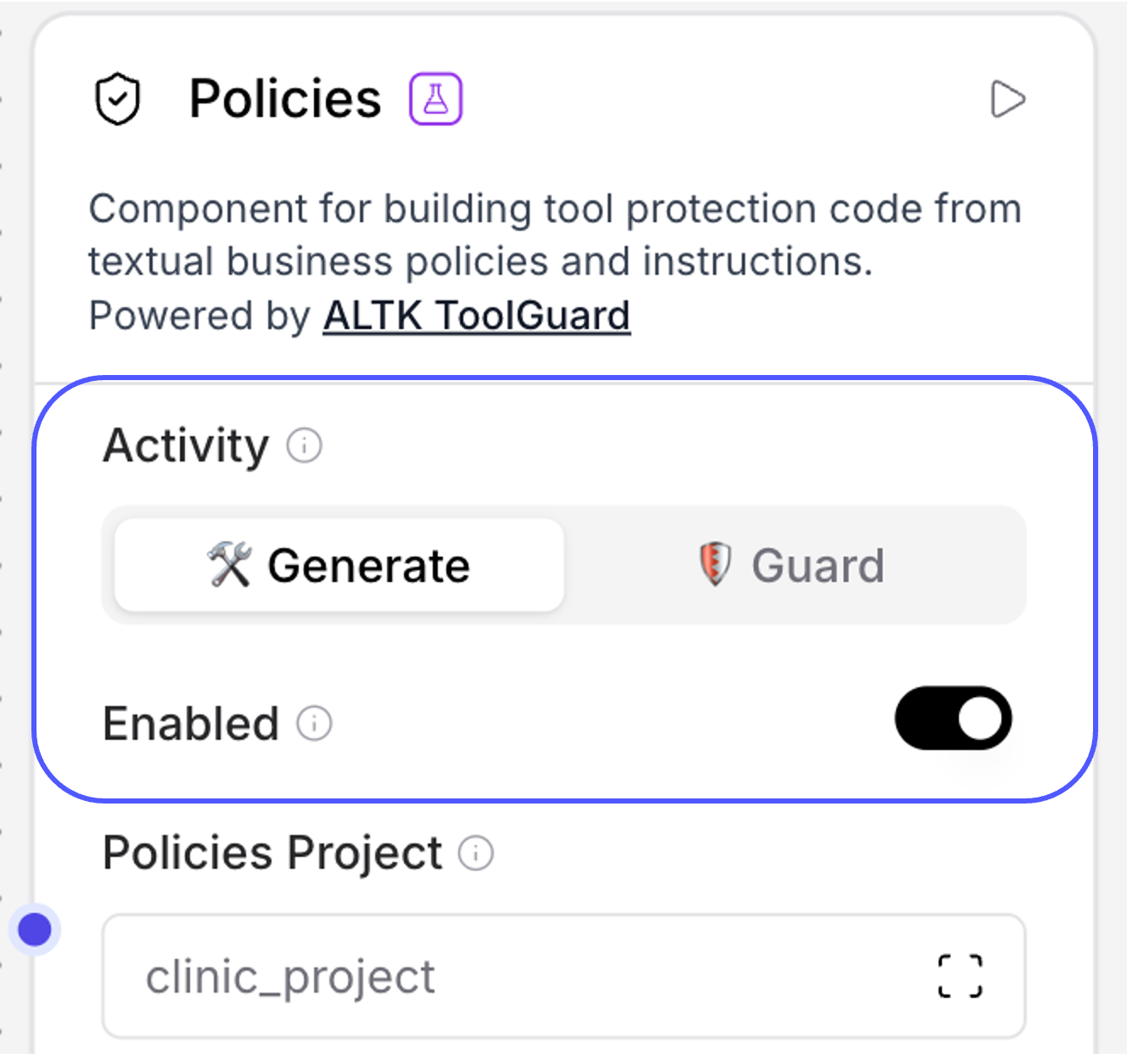
Step 3 - Enable Guard mode after initial code generation. - Setting the "Enabled" toggle to True enforces policy validation before tool execution; disabling it bypasses ToolGuard and reverts to the raw execution flow.
- Each workflow should have its own project path (e.g., "clinic_project") as shown in the screenshot) – that's the relative path for storing the generated code. Each agentic flow should have its unique project path.
- Enter clear, well-defined policies in natural language—ideally concise sentences. At least one policy is required for execution.
- Choose a language model for generating ToolGuard code (this is separate from the agent's LLM). We recommend using models from the Claude-Sonnet family.
- Use "Generate" mode for the initial guard code generation, after review & approval switch to "Guard" mode for runtime execution.
-
Run the component by clicking the Run button in the top-right corner.
-
Review and refine the generated code. Check the right-hand side panel displaying the generated guard code – this view lists all generated Python files. You can review and modify the code if needed. Note the automatically generated logic that enforces the Gold customer discount policy in our clinic usecase.
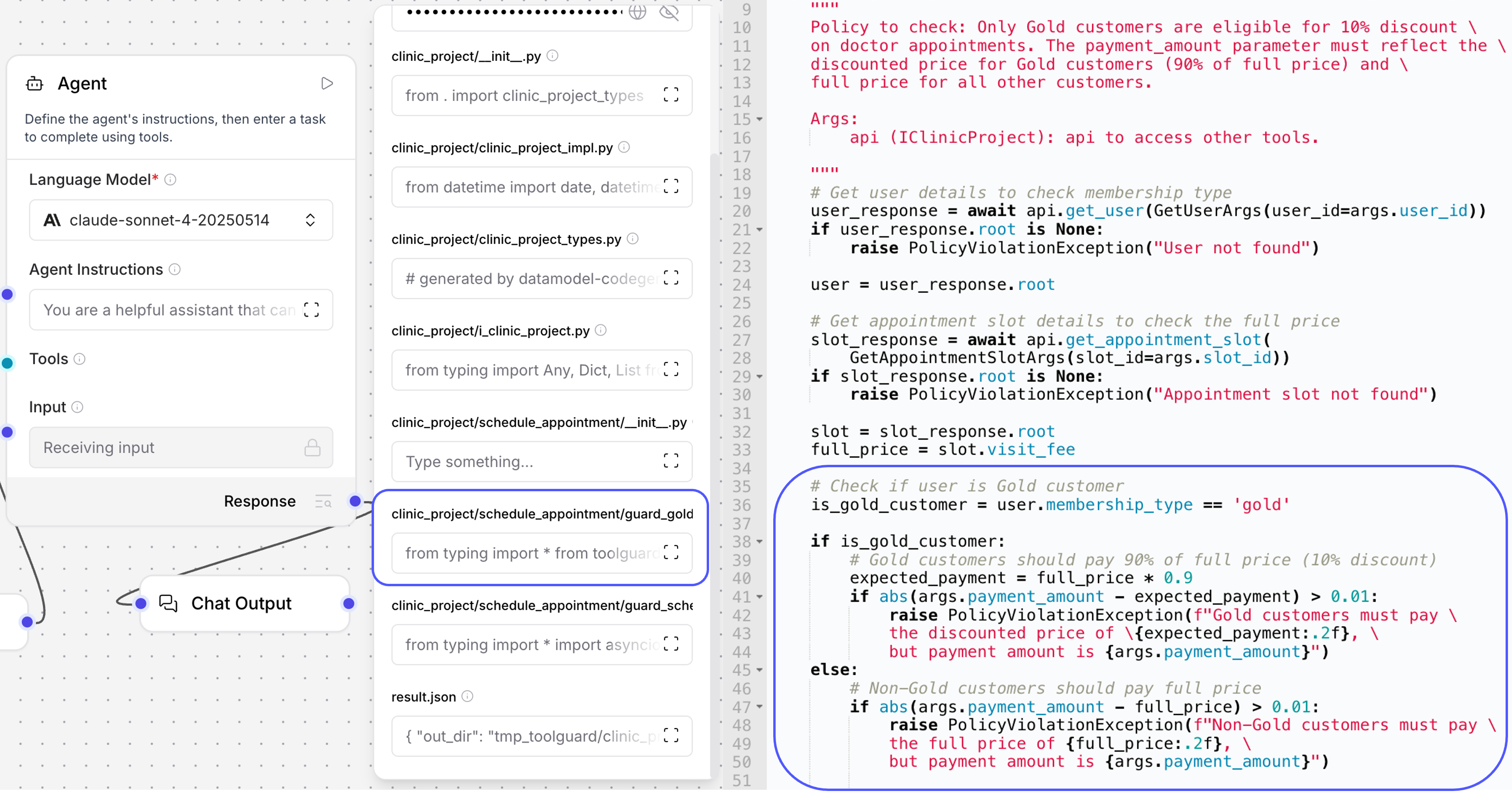
Step 5 - The right-hand panel showing the generated guard code for the clinic discount policy. Once you approve the code and enable the ToolGuard toggle, the guard logic will execute before any tool invocation to ensure compliance with the defined policies.
Video demo
See also
To explore a more complex scenario that includes a flights reservation system with multiple policies, download the template flow as JSON here and drop it right into Langflow.
For more details, refer to our publications on policy adherence enforcement in agentic workflows, including both explicit and implicit policy violation detection: