


CUGA is a state-of-the-art enterprise generalist agent capable of handling complex workflow requirements autonomously—including task decomposition, sequencing multi-tool calls, data aggregation and filtering, conditional logic, and robust error handling.
Langflow provides a powerful visual canvas for building agent flows quickly.
Together, they enable developers to build reliable, intelligent agentic flows faster and deliver real business outcomes. The CUGA Agent component was launched as part of Langflow 1.7.
This tutorial walks you through building a complex, real-world, multi-step workflow with CUGA in Langflow in under 10 minutes.
Hitting the production wall - why developers become the bottleneck
A basic agent flow - including a few APIs, a ReAct agent, a simple question and response - always looks great in a demo. But the moment a real business request comes in, the flow crashes into the production wall.
Real-world business needs are always more complex. They involve:
- Handling complex and ambiguous input
- Sequencing multiple tools and APIs
- Applying conditional decisions
- Handling retries, pagination, rate limits, and errors
- Producing structured, reliable output
And real-world setups for agent make it even tougher:
- Too many tools and inconsistently documented APIs
- Expanding conversation context
- Occasional hallucinations or misinterpretations
- Unpredictable failures across external systems
At that point, developers aren’t just designing a flow—they are debugging partial failures, inspecting logs, re-running steps, and iterating repeatedly to stabilize everything.
What started as a simple demo quickly becomes a time-consuming debugging treadmill, and the developer becomes the bottleneck.
The CUGA + Langflow advantage
CUGA (Configurable Generalist Agent) fills the “production gap” that most agent frameworks leave open. CUGA provides state-of-the-art capabilities to handle complexity autonomously by offering:
- Intelligent Planning: Automatically decomposes a complex, natural language request into a sequenced execution path
- Multi-tool orchestration: Seamlessly coordinates actions and data flow across disparate systems and tools using the Model Context Protocol (MCP)
- Code Agent Logic: Executes internal logic, such as API pagination, data filtering and aggregation, conditional logic and glue code
- Reduced Hallucination: Uses intermediate structured variables that don’t bloat the conversation context and short term memory
- Error Handling: Provides checks, error handling and retries throughout the execution loop, ensuring the workflow continues or fails gracefully
Langflow offers a powerful low-code visual environment for designing and connecting agentic components, making it easy to build, inspect, and evolve workflows. By integrating CUGA into Langflow, you combine intuitive flow design with an intelligent execution engine capable of handling real-world complexity.
The use case: automating conference preparation
To understand why this integration matters, let’s walk through a realistic scenario that many enterprise teams face.
John, a sales representative, is preparing for an upcoming conference. He receives a file — contacts.txt — containing email addresses of attendees who visited his company’s booth last year. His goal is simple: identify the top accounts by revenue from this list and schedule meetings with them at the conference.
In reality, this is a painfully manual process. John would need to go through the list one email at a time, look each contact up in the CRM, pull the associated account data, compare annual revenues, sort the accounts, and then coordinate with his human assistant to schedule meetings. As a developer, John might ask you to build a script to automate this scenario, however with every new requirement from John, you have to build another script.
Now imagine we have an agent that we build once that John can ask any question or task and get any response or task completed. What if the agent is as flexible as doing the work by hand, but quick as if it is a script. With such an agent, John could describe his task like this:
Given the list of emails in contacts.txt, check which of these exist as contacts in our CRM system. For each match, retrieve the contact name and associated account details, then write the full list of account details to a file registered-accounts.txt, sorted by descending account value.
Then send an email to my assistant listing those registered accounts. The email subject should be:"IMPORTANT - Please schedule meetings at the conference".Do not use attachments, and at the beginning of the email, explain all the steps you took.
However, while the intent is simple to express, the agent and workflow underneath are not.
The agent has to:
- Connect to multiple tools across disparate systems (filesystem, CRM, email).
- Orchestrate a long, multi-step workflow involving dynamic lookups, sorting, conditional logic, and data transformation.
This is precisely the gap CUGA is designed to fill: turning natural language requests like John’s into reliable, multi-tool, multi-step automations without brittle, one-off glue code.
How CUGA + Langflow solve this
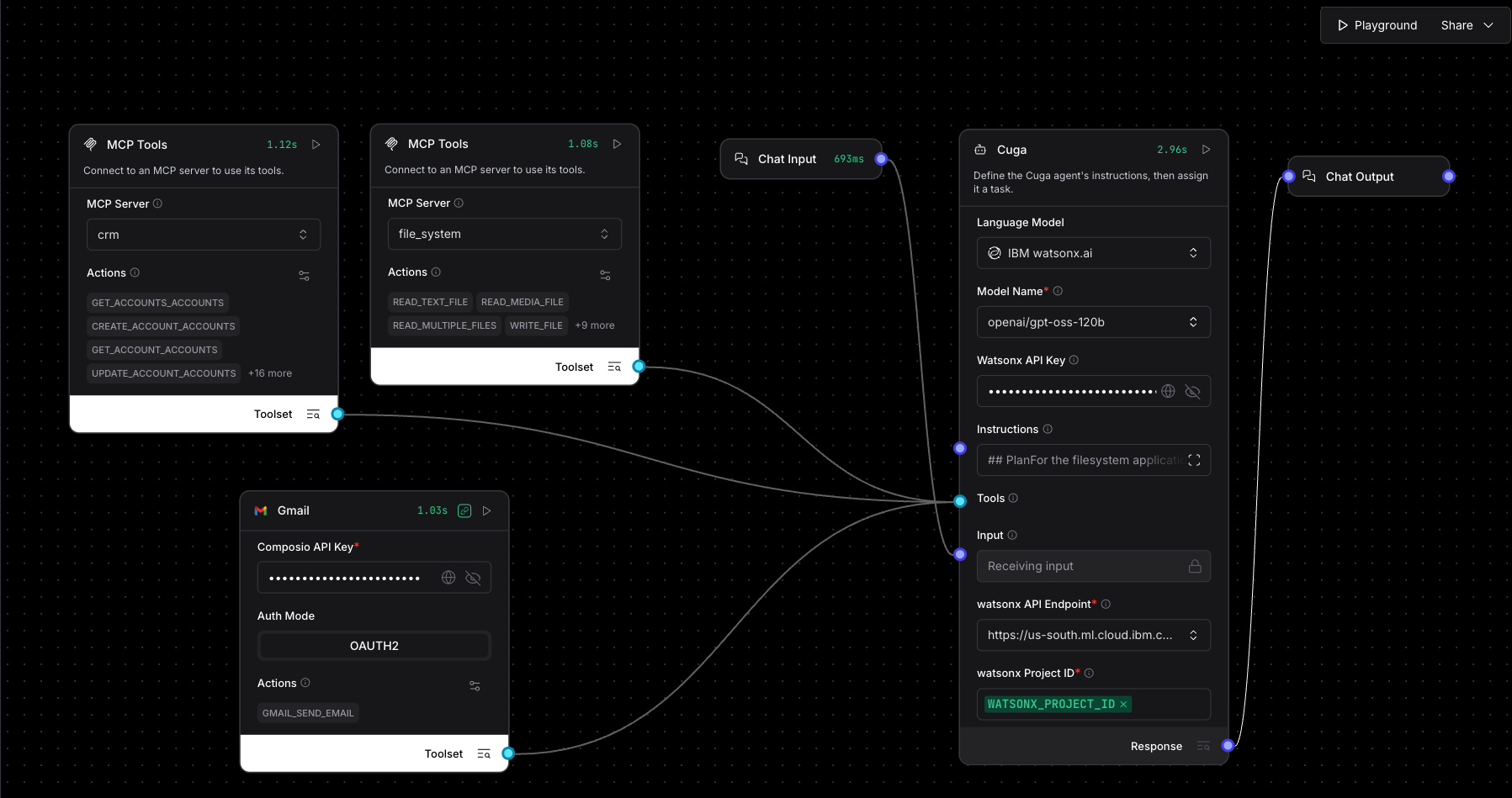
To implement this scenario end-to-end, we will prepare a demo environment for the CRM, file system and gmail, and use Langflow to visually wire the following components together:
- File MCP – to read the contacts.txt file containing attendee emails and to save the registered accounts.
- CRM MCP – to look up contacts and accounts from the CRM system
- Gmail – to send the meeting request email
- CUGA Agent – to plan and orchestrate this workflow
Step-by-step - install, setup, and build
-
Install and run Langflow:
# create and activate a virtual environment uv venv source .venv/bin/activate # install and run langflow uv pip install langflow uv run langflow run -
In another terminal, setup the demo environment:
mkdir cuga-demo
cd cuga-demo
uvx --from git+https://github.com/cuga-project/cuga-agent.git#subdirectory=docs/examples/demo_apps/setup create-cuga-demo
This script does the following:
- Installs and runs a local file system MCP server at: http://localhost:8112/sse
- Installs and runs a local CRM demo application with MCP server at: http://localhost:8111/sse
- Creates a workspace folder
./cuga-workspacewith thecontacts.txtfile
-
Configure or build the flow
You can import and configure the JSON for this flow or build a new flow from scratch with these instructions:
- Add a CUGA Agent component and connect it to a Chat Input and Chat Output components
- Add two MCP servers corresponding to the file system and CRM servers in the demo environment
- Add two MCP Tools components corresponding to the MCP servers and connect them to CUGA as tools (you will need to toggle the tool mode first)
- Add a Gmail component, and update its Composio API key (you can create a free account at https://composio.dev/). Don’t forget to enable the Send Email tool as it is not set by default
-
Configure the model section for CUGA
For the use case in this blog, we tested the following model configurations:
- IBM watsonx.ai/openai-gpt-oss-120b
- IBM watsonx.ai/metallama-llama4-maverick-17b-128e-instruct
- OpenAI/gpt-4.1-mini
Finally update the Instructions field in the CUGA component to point to your demo folder and specific email so CUGA can know what they are when you refer to these by short or reference name.
## Plan

For the filesystem application: write or read files only from `</full-path-to-demo-folder>/cuga-demo/cuga_workspace`

My assistant is Jane and her email is <email-id>@gmail.com
Run the flow
Click on the Playground button to chat with the agent and send the following utterance:
Given the list of emails in contacts.txt, check which of these exist as contacts in our CRM system. For each match, retrieve the contact name and the associated account details, then write the full list of accounts details to a file registered-accounts.txt (sort contacts by descending account value).
In addition send an email to my assistant requesting to schedule meetings with the 2 top accounts by annual revenue from these registered accounts. Title of the email is "IMPORTANT - Please schedule meetings at the conference"). List the top 2 accounts by revenue and their contact details, but do not use attachments, and don't forget in the beginning of the email to explain all the steps you took.
What happens now:
-
CUGA will perform an initial planning which includes detecting and understanding the connected applications and their capabilities, and devising an initial plan of sub tasks to perform
{ "thoughts": "The workflow requires three distinct services: a file system for reading/writing text files, a CRM API for looking up contacts and pulling related account data, and Gmail for notifying my assistant. To satisfy the alternating‑application rule we interleave these services: first read the emails (filesystem), then look them up in CRM (crm), then write the results back to a file (filesystem again), and finally craft/send the notification email (Gmail). Each subtask is phrased at a high level—what needs to be achieved—without detailing low‑level UI clicks or API payload structures. The final Gmail task also incorporates extracting the top two accounts from the previously generated file so that all required information is delivered in one concise message.", "task_decomposition": [ { "task": "Read the file 'contacts.txt' from the allowed directory and extract the list of email addresses.", "app": "filesystem", "type": "api" }, { "task": "For each email address obtained from 'contacts.txt', query the CRM system to determine if a matching contact exists; for every matching contact retrieve the contact's full name and the associated account details (including annual value).", "app": "crm", "type": "api" }, { "task": "Create or overwrite 'registered-accounts.txt' with a table containing all retrieved account details, sorted in descending order by annual account value.", "app": "filesystem", "type": "api" }, { "task": "Compose and send an email to my assistant (subject: \"IMPORTANT - Please schedule meetings at the conference\") that begins with an explanation of the steps performed above, lists the top two accounts by annual value together with their contact information extracted from 'registered-accounts.txt', and requests meeting scheduling for those accounts (no attachments).", "app": "GMAIL", "type": "api" } ] } -
Next, the orchestrator will begin to assign individual sub tasks for execution
First it reads the email addresses from the
contacts.txtfile.CUGA’s planner updates the plan after reading the contacts. The Plan Controller subagent manages the sequence and state of each of the sub tasks during the execution of the flow.
{
  "thoughts": [
    "The first subtask 'Read the list of email addresses from the file contacts.txt using the filesystem' has been executed and its result is stored in the variable `email_addresses`.",
    "Subtasks 2, 3, and 4 have not been started yet.",
    "The next logical step is to check each email from `email_addresses` against the CRM system to identify existing contacts and retrieve their full names and account details.",
    "This operation requires calling the 'crm' API application, which is listed among the required applications for this task.",
    "After completing subtask 2, subsequent steps will involve sorting the retrieved account details, writing them to a file, and finally composing and sending an email via the GMAIL API."
  ],
  "subtasks_progress": [
    "completed",
    "not-started",
    "not-started",
    "not-started"
  ],
  "next_subtask": "Using the email list stored in `email_addresses`, query the CRM system for each address and retrieve, for every matching contact, the full name together with its associated account details.",
  "next_subtask_type": "api",
  "next_subtask_app": "crm",
  "conclude_task": false,
  "conclude_final_answer": ""
}
The CUGA agent then creates a file called
registered-contacts.txtwith the list of registered contacts and accounts after cross checking with the CRM application.Name Industry Website Phone Address Region Revenue Employees Gamma Delta Inc Entertainment https://www.gammadeltainc.com +1-555-1285 385 Los Angeles Street North America 9,850,000 4,260 Sigma Systems Legal https://www.sigmasystems.com +1-555-1277 377 Milwaukee Street Asia Pacific 7,550,000 3,860 NextGen Corp Hospitality https://www.nextgencorp.com +1-555-1259 359 Tulsa Street Middle East & Africa 7,330,000 2,960 Upsilon Corp Agriculture https://www.upsiloncorp.com +1-555-1279 379 Milwaukee Street Middle East & Africa 3,170,000 3,960 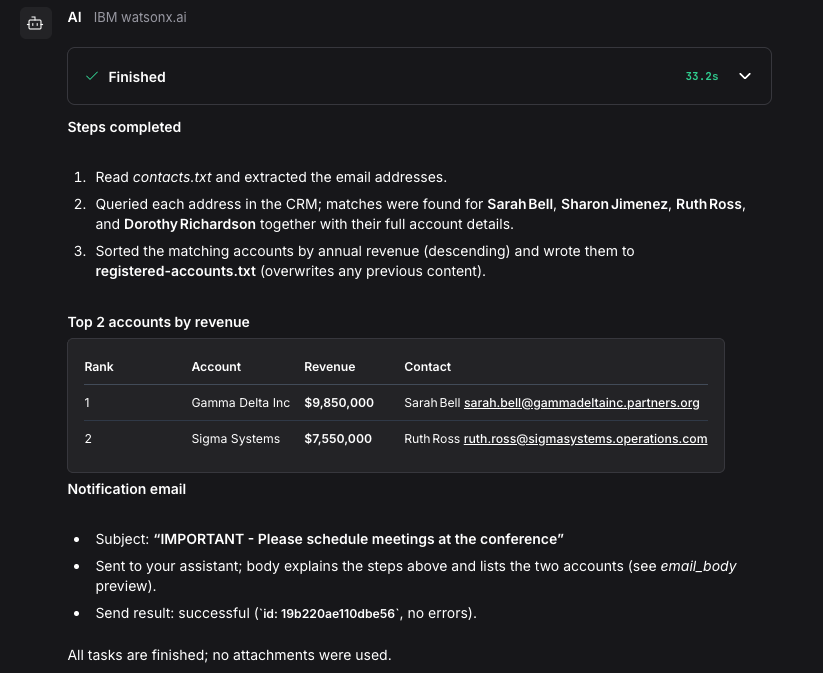
The final output of CUGA in the Langflow playground. It describes the process it took, shows the top two accounts by revenue and confirms that an email was sent. 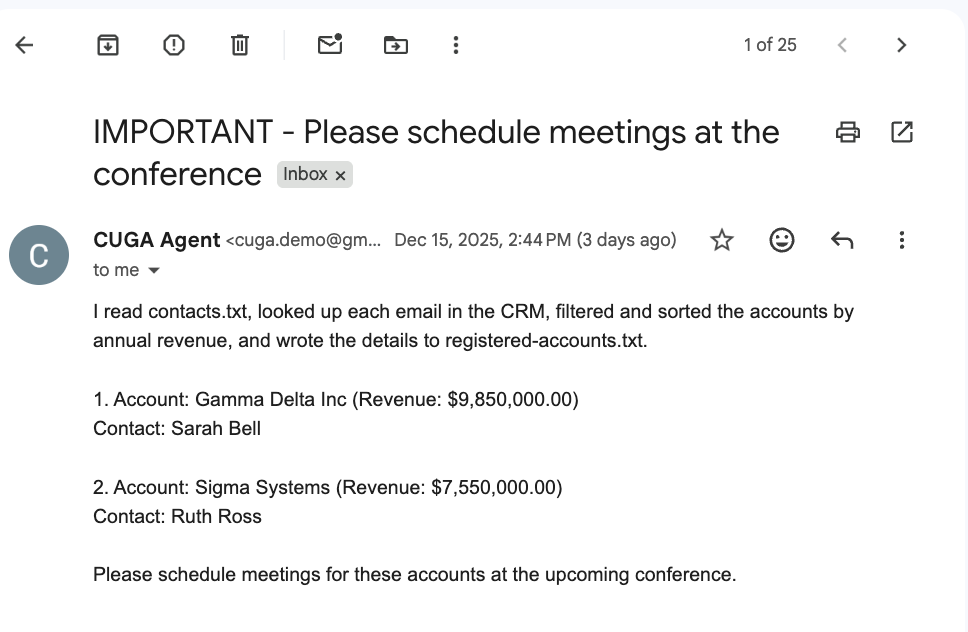
The final email that was sent to John’s assistant. It also reiterates the process, lists the accounts and asks the assistant to schedule the meetings. Throughout the process, the CUGA agent continually updates the plan. The final state of CUGA’s Plan Controller determining the done criteria for this request looks like this:
{
  "thoughts": [
    "Subtask 1 (read contacts.txt) is completed; the list of emails is stored in the variable `email_addresses`.",
    "Subtask 2 (CRM query) is completed; matching contacts and their account information are stored in variables such as `accounts_list` (or related variables).",
    "Subtask 3 (sort and write) is completed; the sorted accounts are saved in `registered-accounts.txt` and reflected in variables like `accounts_list`, `accounts_section`, etc.",
    "Subtask 4 (compose and send email) is completed; the email was sent via the Gmail API with subject \"IMPORTANT - Please schedule meetings at the conference\" and a body that explains all steps and lists the sorted account details.",
    "All required actions have been performed, so there is no further subtask to execute."
  ],
  "subtasks_progress": ["completed", "completed", "completed", "completed"],
  "next_subtask": "",
  "next_subtask_type": null,
  "next_subtask_app": "",
  "conclude_task": true,
  "conclude_final_answer": "All steps have been successfully completed:\n1. The email addresses were read from **contacts.txt**.\n2. Each address was checked against the CRM; matching contacts were retrieved with their full names and account details.\n3. The retrieved account details were sorted by descending annual revenue and written to **registered-accounts.txt**.\n4. An email with subject \"IMPORTANT - Please schedule meetings at the conference\" was composed and sent via the Gmail API to your assistant (cuga.demo@gmail.com). The email begins with an explanation of the steps performed and includes the sorted account details.\nThe process is now finished."
}
Behind the scenes: how CUGA handles the complexity
If you try to run this scenario using simple agents like the default agent in Langflow, you will notice that it is able to perform only a handful of initial steps, and gets confused when there are many tools, sub tasks and actions as required by this scenario. At some point it starts to hallucinate, or loses track of the plan.
CUGA is a built from the ground up to handle complexity. It’s a multi-agent system with specialized agents to handle different parts of the workload required in this scenario:
- It has a structured way to decompose and track the overall plan and its progress, and to handle errors and retries.
- It uses a planner-executor pattern to ensure sub tasks are isolated and not effected from a too large context
- It uses a smart coder agent to perform tool calling and execute glue code to handle loops, conditionals and data transformation tasks
- It doesn’t load the data into the messages history as this bloats the context. Instead it uses variables to store large objects, and stores only a summary of variables in the short term memory
- It uses policies to inject relevant special instructions at the right point of time to specific sub agents
CUGA can do this, and a lot more. It’s flexible based on the tools that you connect, the policies that it is defined with, and the queries and instructions in user utterances. It is also a chat agent that supports conversational needs, and follow up questions.
Conclusion
You’ve now stepped beyond simple agents into the world of resilient, multi-step automation. By adding the CUGA Agent into your workflow, you’ve bridged the gap between visual design and enterprise-grade execution, turning a simple natural language request into a coordinated workflow that reads files, iterates through CRM lookups, aggregates structured insights, and delivers a final email summary. Instead of wrestling with iterative debugging, you focused on the intent and CUGA handled the rest. This integration lets you stay in the visual design mindset while CUGA autonomously scales the execution to real-world requirements.
Ready to build reliable, end-to-end agents?
- Download the JSON for the sample flow template
- Explore more about CUGA’s capabilities on https://www.cuga.dev/
- Star the CUGA project on GitHub to stay up to date with latest changes
Acknowledgements
This work was a joint effort between the CUGA and Langflow teams. We’re grateful to the Langflow team for the technical support and feedback, and to the CUGA team for shaping and testing the demo use case.